> ## Documentation Index
> Fetch the complete documentation index at: https://docs.brokencompassrp.com/llms.txt
> Use this file to discover all available pages before exploring further.
# Tow Job
## How to Get The Job
You can get the job at the City Services counter. If you don't have a vehicle you can [/taxi](/basics/overview#taxi-service) and have it take you to the GPS marker you have. The marker is a white shield seen below.
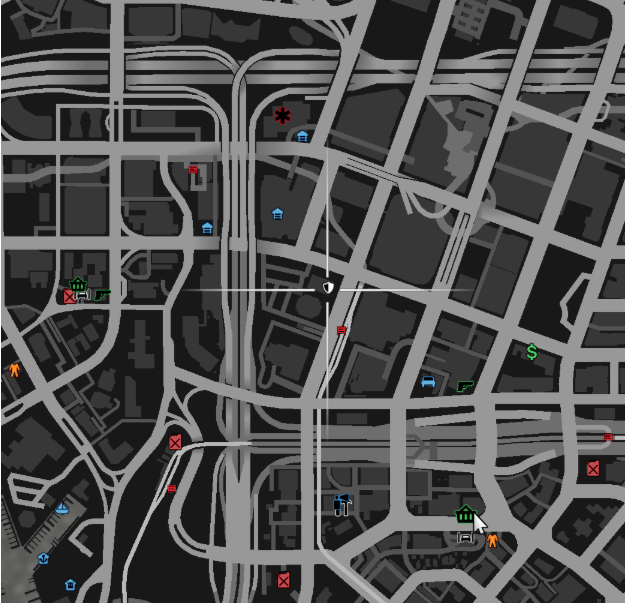 You can always get the job back by coming here and requesting it again.
## Getting To The Job Area
You can also use [/taxi](/basics/overview#taxi-service) to take you to the job area. You'll find the job set up around Los Customs near the airport, south of the City Services counter and Vespucci.
You can always get the job back by coming here and requesting it again.
## Getting To The Job Area
You can also use [/taxi](/basics/overview#taxi-service) to take you to the job area. You'll find the job set up around Los Customs near the airport, south of the City Services counter and Vespucci.
 There is also a Los Customs shop set up for people to customize their vehicle there, as well as a crafting bench.
## Getting A Job Vehicle
The jobs vehicle can be obtained by walking to the red arrow. It only appears as you get close to it. Once you are close, the menu will appear.
The flatbed tow truck seems to be the easiest to use.
When finished with the job, you return the truck to this same location. Just drive up to the marker and press E to return it.
There is also a Los Customs shop set up for people to customize their vehicle there, as well as a crafting bench.
## Getting A Job Vehicle
The jobs vehicle can be obtained by walking to the red arrow. It only appears as you get close to it. Once you are close, the menu will appear.
The flatbed tow truck seems to be the easiest to use.
When finished with the job, you return the truck to this same location. Just drive up to the marker and press E to return it.
 ## The Job Stash
This job currently does not have a stash location.
## Getting Paid
To get paid out, approach the blue office door inside the Los Customs shop. It will automatically pay for however many vehicles have been towed.
## The Job Stash
This job currently does not have a stash location.
## Getting Paid
To get paid out, approach the blue office door inside the Los Customs shop. It will automatically pay for however many vehicles have been towed.
 ## The Job Shop
This job currently does not have a job shop.
## The Job Sign-Off
This job currently does not require you to sign off.
## Doing The Job
To start towing vehicle, you can open the [radial menu](/basics/overview#radial-menu) by holding Z, selecting 'Job' from the options, and then toggling on the NPC.
## The Job Shop
This job currently does not have a job shop.
## The Job Sign-Off
This job currently does not require you to sign off.
## Doing The Job
To start towing vehicle, you can open the [radial menu](/basics/overview#radial-menu) by holding Z, selecting 'Job' from the options, and then toggling on the NPC.

